Working With An SSH Client
Modern Operating (Microsoft Windows, Apple MacOS and Linux) Systems already have ssh client inbuilt; however there are other ssh applications with added features that offers better experience.
Windows
Microsoft Windows does offer ssh which is accessible through Powershell or the CMD. Users have the alternative of putty and MobaXterm.
Linux
Linux offers a command line terminal by default
MacOS
MacOS includes a built-in terminal window, there’s nothing to install. Just open the terminal app and type your SSH command. The default terminal app doesn’t offer many bells and whistles but it gets the job done.
For Robust Terminal experience, Alternatives include Termius and iTerm2
Connect to the login node from your terminal:
Type the following on the command-line
$ssh username@allot.hpc.fedgen.net
First time login users will be prompted to change their password. Passwords must adhere to standard complexity requirements.
The more complex the password, the more robust it is against brute force. see password section below
If everything worked properly, you should be greeted by a message similar to

Note
Upon your very first connection to each FEDGEN HPC Cluster, you will be greeted by a warning such as the one below:

This warning is normal, the SSH program warns that it is the first time it sees this computer. To make sure you are actually connecting to the right machine, you should compare the RSA key fingerprint shown in the message with the fingerprint shown in the picture above. The fingerprint can be based on hash function MD5 or SHA-256.
If they match, you are safe to proceed and enter yes. That hostname key will be stored and used to check in every subsquent SSH connection that the server is indeed always the same.
Using Secured Passwords
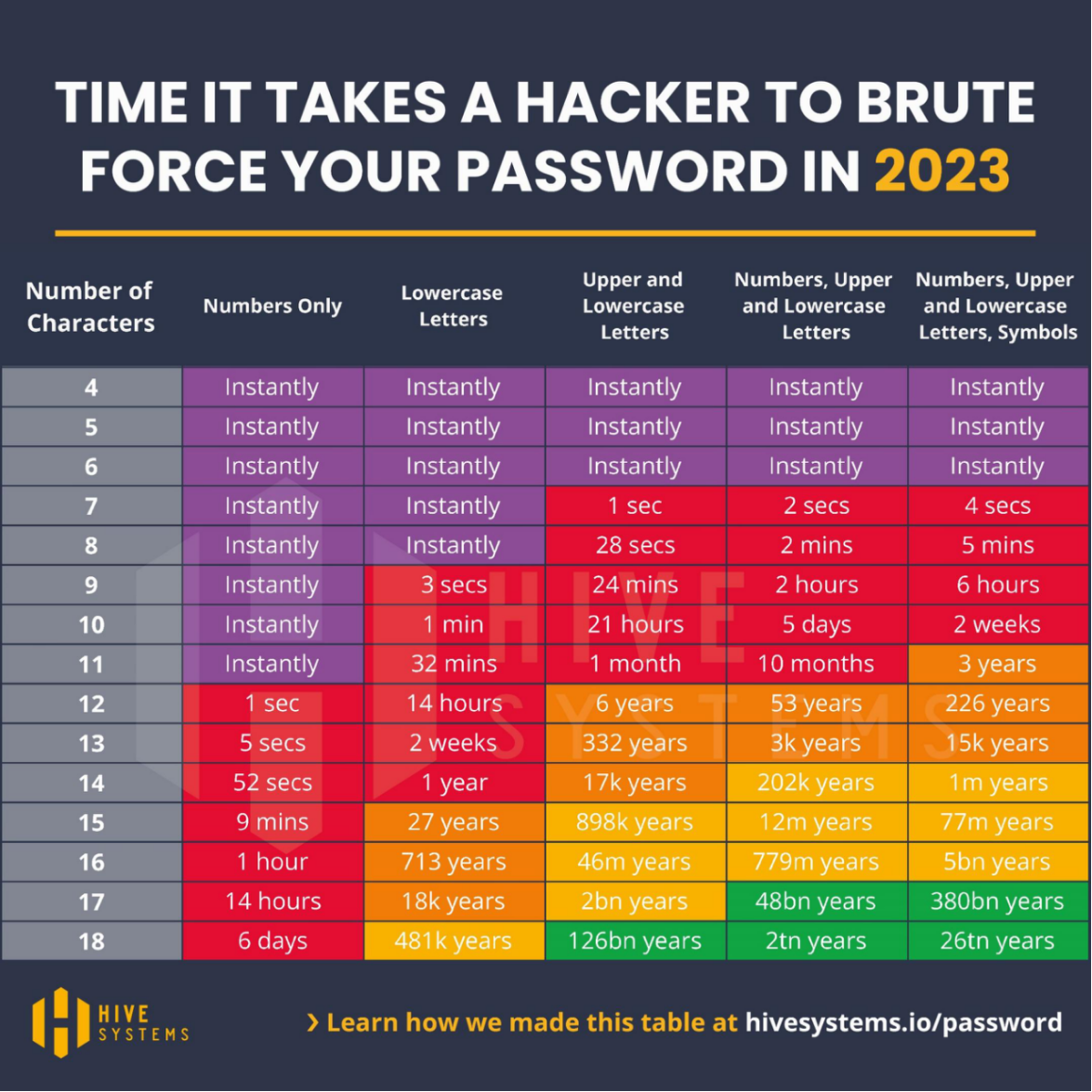
*Fig. 1 *Time to brute force a password in 2023 as a function of length and complexity. Credit: Hive Systems with data sourced from https://www.hivesystems.io
Exemple of hacked passwords
mt8CIe0Qhh |
eisenach! |
123avier123 |
avier123a12345678910 |
Kraz2kriz |
alaska2. |
12345678910 |
04DI32609 |
ag.53yf |
Kraz2kriz |
firebird14 |
04IE69422 |
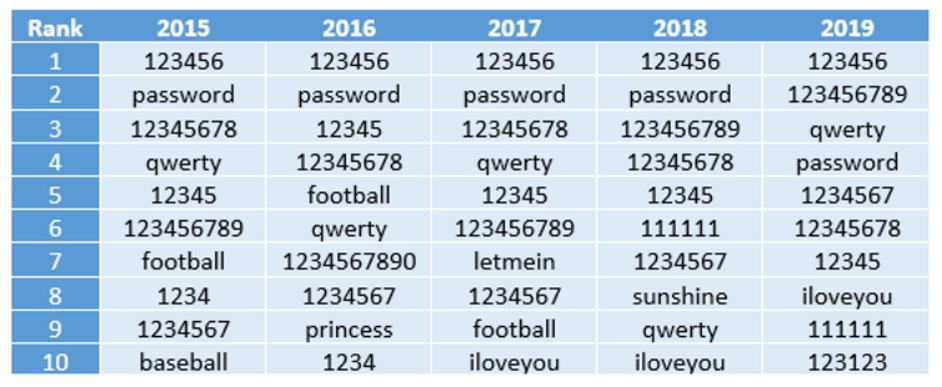
*Fig. 2 *The 2019 annual SplashData password survey revealed the most common passwords from 2015 to 2019.